RadChart  by Dfive Strategies Ask about setup and pricing

Practice management and charting

Run your whole practice from one place.

RadChart handles booking, visits, charting, lab results, fax, payments, staff and your HIPAA compliance records. An AI assistant writes the first draft of your visit notes, and RadChart checks that draft against the visit and the chart before you read it.

For practices that patients pay directly. Set up privately for your practice, and built for HIPAA.

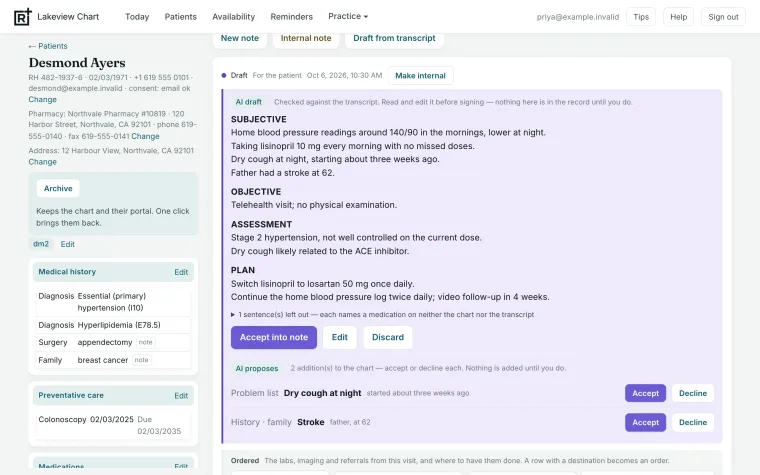
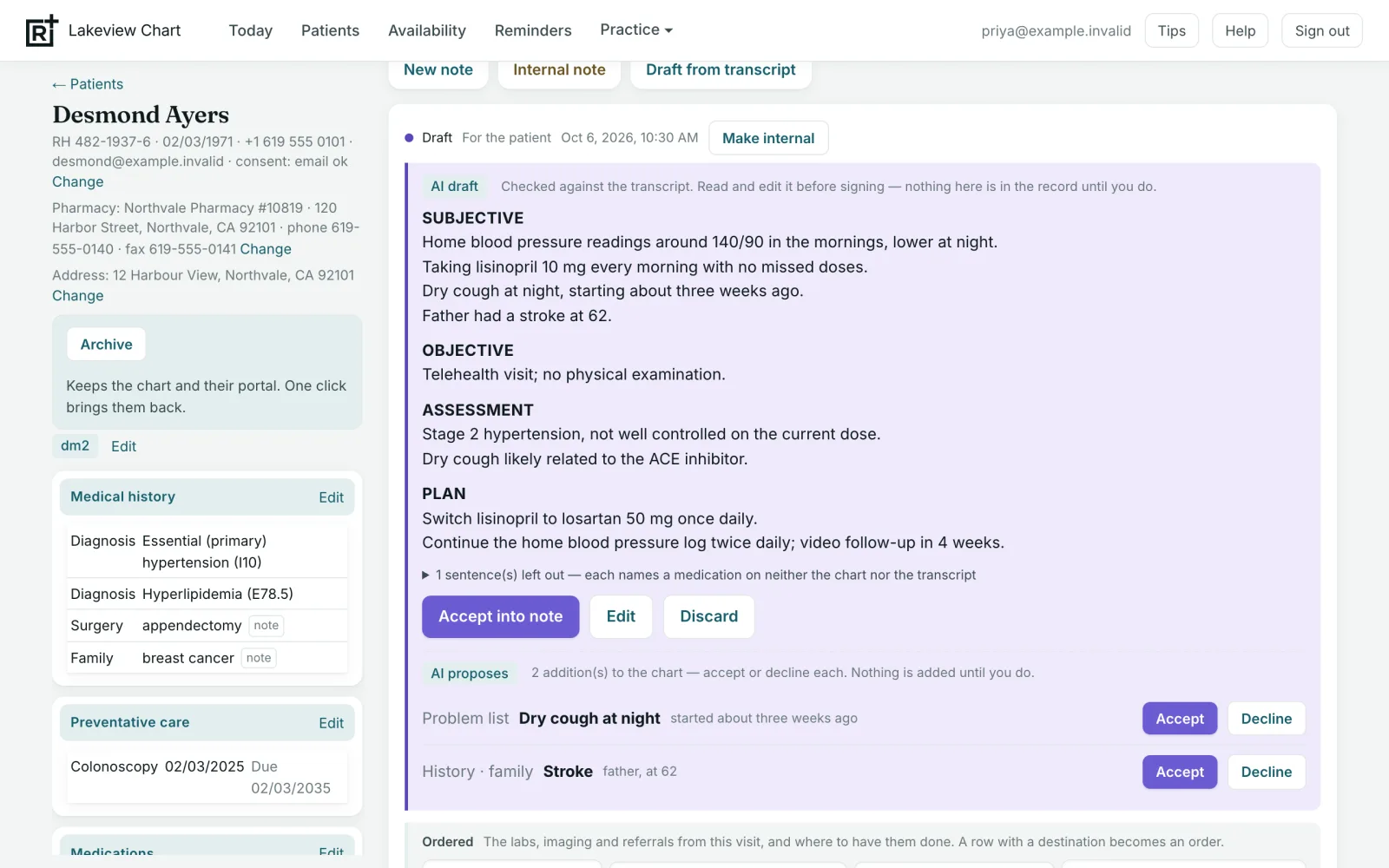
A visit note drafted by the AI assistant, next to the patient's chart, with buttons to accept, edit or discard it, and two suggested additions to the chart.

Built with the people who see the patients

RadChart started inside a working practice, not on a whiteboard. We sat with the nurse practitioners and physicians who would use it and built it around how their days actually run, from the first booking to the signed note.

Every screen was walked through as it would be on a real day, and anything that didn’t fit was changed. Patients book their own visits from the times the provider has open, so no one plays phone tag to find a slot. An in-person visit gets its AI-drafted note just like a video visit. If something didn’t serve the patient or save the provider time, it didn’t go in.

Everything that can run on its own does: reminders, forms, payments, the first draft of the note and the records compliance asks for. That leaves the provider free for what matters most: caring for patients, helping them get good outcomes, and giving them service they notice.
Who it's for

Anyone who sees patients or runs the practice they're seen in.

Physicians

See patients by video or in person, chart, order labs and sign notes. Supervise nurse practitioners and review their charts.

Nurse practitioners

The same tools as a physician, plus your standardized procedures and your monthly chart reviews, kept in one place.

Practice owners and managers

Staff accounts, who can open which charts, payments, and the compliance records the practice has to keep.

Reviewing physicians

A physician can review a practice's charts each month without being one of its providers. They can read and comment, and nothing else.

A good fit for: telehealth practices, direct primary care, concierge medicine, house calls, functional and integrative medicine, psychiatry, weight management, and any small medical practice where patients pay for their own care.

Seeing patients

Patients have their own portal and you have RadChart. Both work on any computer, tablet or phone.

Before the visit

Booking, forms and payment, done before the visit

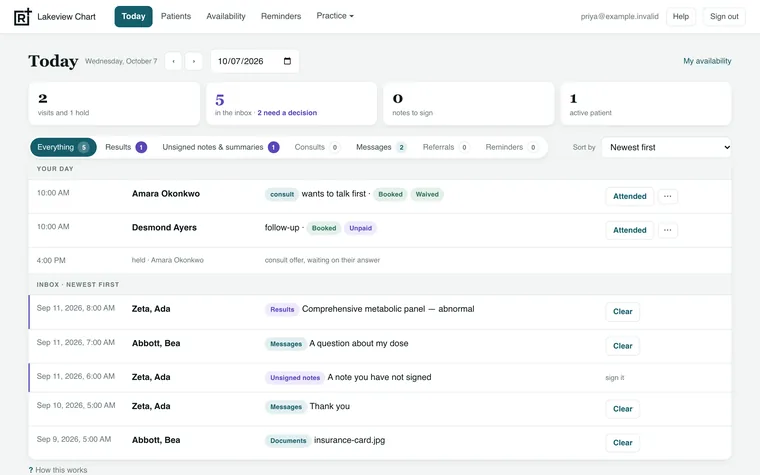
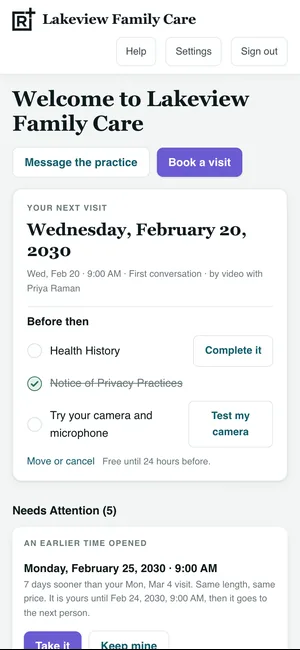
Patients book an open time, fill in their forms, sign their consents and pay in their own portal, on a computer, tablet or phone. You see your whole day on one screen: visits, results to review and notes still to sign.

  • Patients pay by card or bank transfer
  • Patients who pay for themselves get a written cost estimate, as the law requires
  • Patients can test their camera and microphone before a video visit
The provider's day: visits, results and messages to read, and notes to sign.
The patient's portal: the next video visit, forms still to fill in, and a camera check.
The visit

Visit notes, drafted for you

Video visits are set up for you, and patients join from their portal. If the patient agrees to be recorded, the transcript is added to the chart after the call and the AI assistant drafts a SOAP note from it, in the way you write your notes.

For an in-person visit, record it on your phone or laptop and the note is drafted the same way. Phone visits go on the same chart: write the note yourself, or upload a transcript.

  • A note is only drafted if the patient agreed to be recorded
  • The assistant reads the patient's medications, allergies and problems along with the transcript
  • Nothing goes into the record until you sign it
A drafted SOAP note next to the patient's chart, with Accept, Edit and Discard.
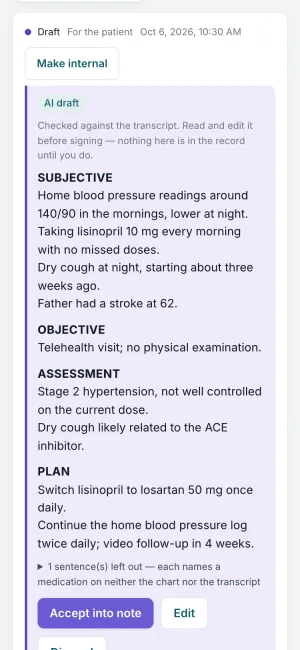
A drafted SOAP note on a phone, under Subjective, Objective, Assessment and Plan.
The check

Every draft is checked before you read it

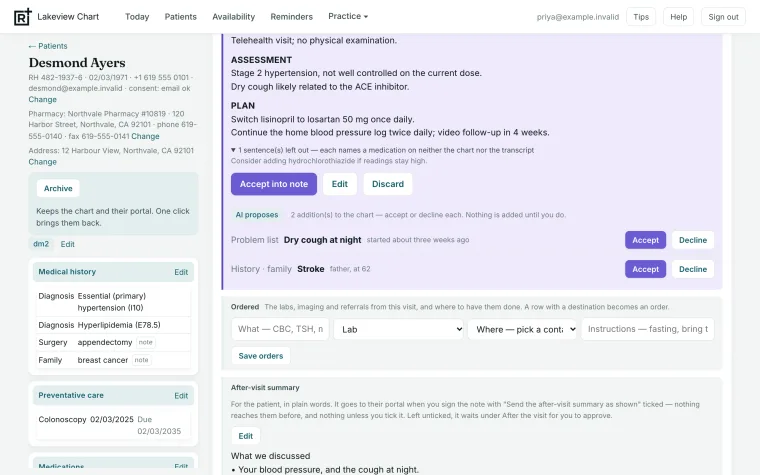
RadChart checks every medication the draft mentions. It must have been said in the visit or already be on the patient's medication list. If it isn't, the sentence is taken out and you're told why.

  • New diagnoses and history are suggested next to the note, for you to accept or decline
  • Nothing is added to the problem list unless you accept it
A sentence naming a medication taken out of the draft, with the reason, and two suggested additions to accept or decline.
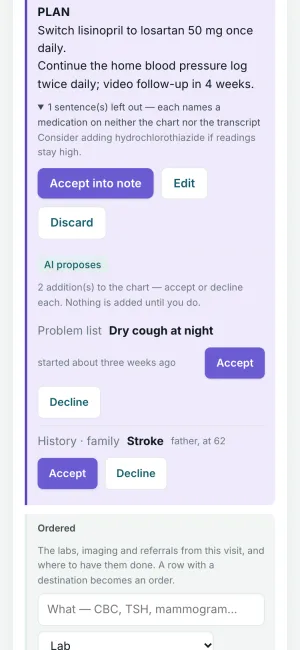
One sentence taken out because it names a medication that is on neither the chart nor the transcript.
Results

Lab orders and resultsNew

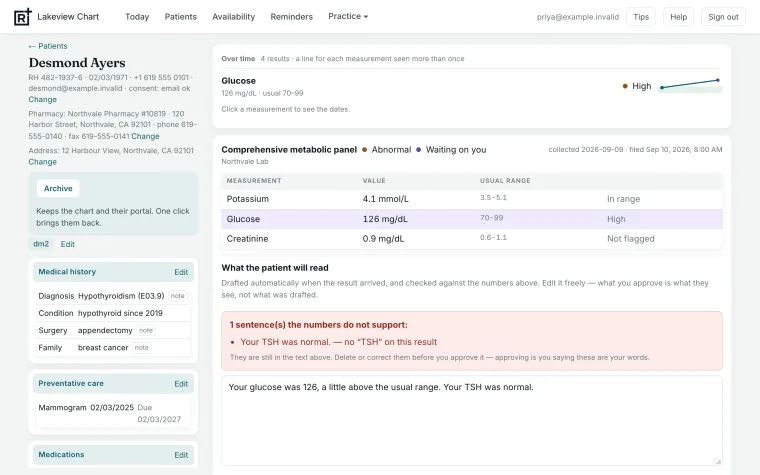
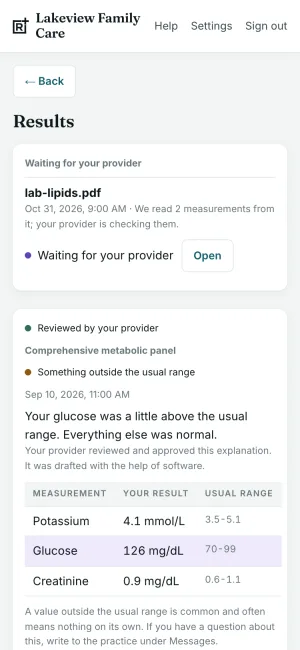
Order labs from the chart, and the patient gets the order in their portal and by email. When results come back, RadChart reads the numbers from the lab's PDF and drafts a short explanation for the patient. You edit it, then release it.

  • A sentence the numbers don't support is flagged before you release it
  • Tests done more than once are shown over time
  • HIV, hepatitis and drug-screen results are held until the patient has been told
A lab panel waiting for review: the values, glucose over time, and the drafted explanation with one sentence flagged.
The patient's results: an explanation their provider approved, above the values and normal ranges.
Fax

Send and receive faxesNew

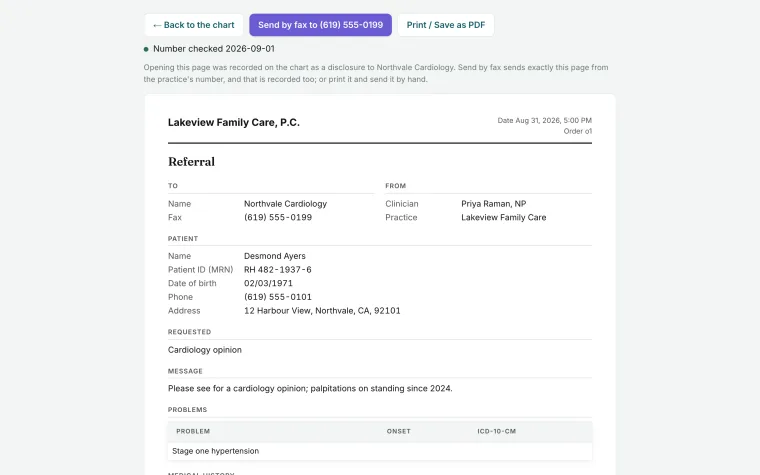
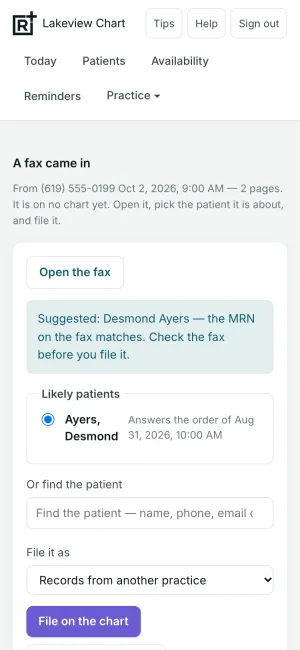
Referrals and lab orders are printed on your letterhead and faxed from your practice's own number in one click. Faxes that come in appear on your day screen, with the patient they seem to be about.

  • A copy of every fax you send is kept on the chart
  • Nothing is filed until someone confirms the patient
A referral to a cardiologist, ready to send by fax to the specialist's number.
A fax that came in, with the chart it matches by record number.
The record

Coded, signed, and yours to take with you

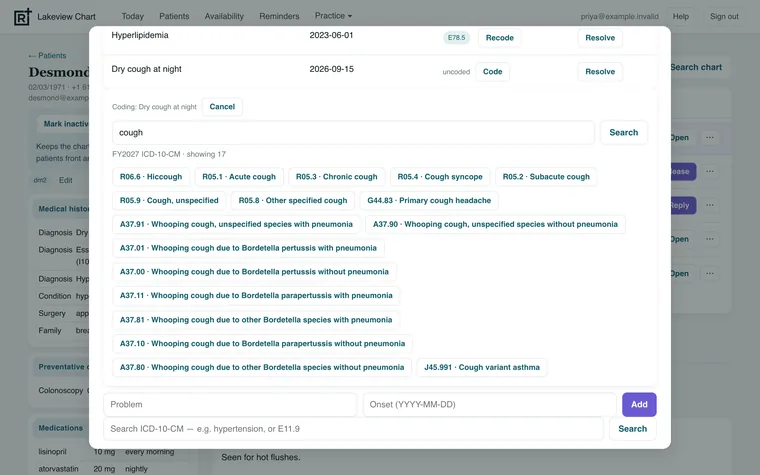
Diagnoses are coded with this year's ICD-10-CM codes. A note becomes part of the record only when you sign it. The whole chart can be exported as FHIR R4, the standard format other health systems read.

  • Signed notes can't be changed; corrections are added as addenda
  • Every view and every change is recorded, with who made it
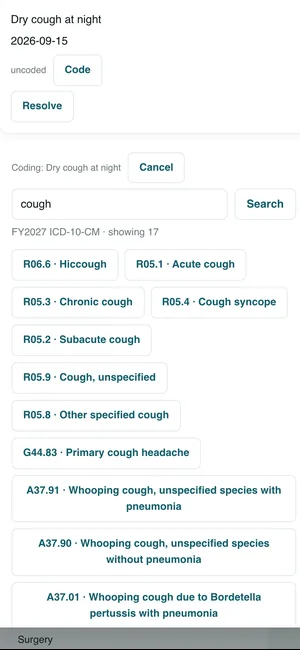
The problem list with two coded problems and one being coded from ICD-10-CM search results.
Coding a new problem: ICD-10-CM codes for cough.

Screens show example data.

DictationNew

Speak instead of typing, anywhere in the chart. An add-on, for each provider who wants it.

Dictate into any text box

Click into a text box and a Dictate button appears beside it. Speak naturally, pauses and all, and your words appear as you talk. The speech model is built for clinical language, so it knows drug names, doses and medical terms.

Tidy, when you want it

One button turns spoken commands like “new paragraph” or “bullet” into formatting, and takes out the “um”s and self-corrections. You see the tidied text before anything changes.

Nothing is kept

Your voice becomes text as you speak. The sound is never recorded or stored.

Running the practice

The day-to-day work around the visits, in the same place as the chart.

Schedule

Set the hours each provider is available, and patients book the open times. Visits arranged by phone or in person go on the same calendar.

Payments and receipts

Patients pay online by card or bank transfer. Cash, checks and card-machine payments in the office go on the same receipts.

Bills for whoever paysNew

A parent, partner or employer can pay for a patient's visits. They get the bill and receipt by email, with nothing clinical on it.

Superbills

An itemized receipt patients can send to their insurance, FSA or HSA, with the codes and provider details already filled in.

Messages and reminders

Secure messages with files between patients and the practice, and reminders set from the chart for you, the patient or both.

Staff and access

Each provider and administrator has their own login. You choose who else in the practice can open each chart, and share patient handouts and links from one library.

Your compliance, kept up to date

A practice has to keep records of its HIPAA program for six years. RadChart keeps them for you, shows what is due, and flags anything overdue.

Training for everyone

Everyone in the practice, office staff included, has a HIPAA training record. Each person records their training and sees when it is next due. They can upload a certificate or take CMS's free course from inside RadChart.

Privacy and security officials

Who holds each role, and since when.

Business associate agreements

Every vendor agreement, with the signed copy and the date it is next reviewed.

Risks and incidents

A list of known risks, and an incident log that shows the deadline for notifying patients.

Policies and procedures

Every version kept, signed and dated, including a nurse practitioner's standardized procedures.

Physician chart review

Each month a random set of charts is chosen for a reviewing physician, who can read and comment but not change them.

Daily security checks

Every day RadChart checks its own security settings and records the result.

Old records are kept

Old versions are kept with their dates, and every view and change to a chart is on a record that can't be edited.

Private by design

Your own system

Each practice runs on its own private setup, under a business associate agreement.

You are the author

The AI assistant drafts; it never signs. Every note needs your signature.

Nothing clinical to payments

The payment processor sees an amount and a reference number, never a diagnosis or a name.

Patients choose

A visit is only recorded if the patient agrees, and patients choose how the practice may contact them.

How it works

We set it up with you, one on one. No sales call unless you want one.

1

Tell us about your practice

Use the form below: how many providers you have, how you see patients, and what you use today.

2

We set it up for you

Your own private system, your letterhead and fax number, your services and prices, and an account for each person. The agreements are signed before any patient information goes in.

3

Start seeing patients

Patients book from your link, and the chart fills in as you work. We're available for changes.

Questions

Is it a full practice management system?

For a practice that patients pay directly, yes: scheduling, forms, payments, receipts, staff, compliance and the chart are all in one place. It does not submit insurance claims, so a practice that bills insurance would still need a billing service.

Does it bill insurance?

No. Patients who want to claim from their own insurance, FSA or HSA get a superbill with everything their plan asks for.

Does the AI assistant work for in-person visits?

Yes. If the patient agrees, record the visit on your phone or laptop. RadChart turns the recording into a transcript, drafts the note the same way as for a video visit, and deletes the recording within a day.

Does it send prescriptions?

Coming soon. Sending prescriptions from the chart, through a certified e-prescribing service, is on the way. Until then, prescriptions stay in your current e-prescribing service, and the patient's medication list in RadChart is what the AI assistant and the check use.

Is it HIPAA compliant?

It's built for HIPAA: a private setup for each practice under a business associate agreement, encryption, a record of every view and change, and the compliance records above. Being compliant also depends on how a practice works, so we go through it with you during setup.

Can I take my records with me?

Yes. The whole chart exports as FHIR R4, the standard format other health systems read, and notes are kept as plain text.

Does it send text messages?

Coming soon. Text notices are built and waiting for the phone carriers to approve them. Patients will choose whether to get texts, and a text never includes health details: it says there's something new and links to the portal. Until then, notices go by email.

What does it cost?

Setup and pricing depend on your practice. Tell us a little in the form below and we'll reply by email.

Ask about setup and pricing

Tell us a little about your practice. We'll reply by email and work out the setup and pricing with you.

Please don't include any patient information. You can also write to info@dfive.us.

Made by Dfive Strategies

RadChart is one of the tools Dfive Strategies builds and runs, along with Dfive Biz, scheduling and private AI answers.

See what else Dfive builds